






Step by Step installing Oracle 11g R2 on Oracle Solaris 10
Posted by Kamran Agayev A. on March 27th, 2011
In this step by step tutorial I’m going to show you the steps of installing Oracle 11gR2 on Oracle Solaris 10. For this, download Oracle 11gR2 and Oracle Solaris 10, create virtual machine and install Oracle Solaris 10 using my following step by step tutorial:
http://kamranagayev.wordpress.com/2010/11/03/step-by-step-installing-oracle10gr2-on-oracle-solaris/
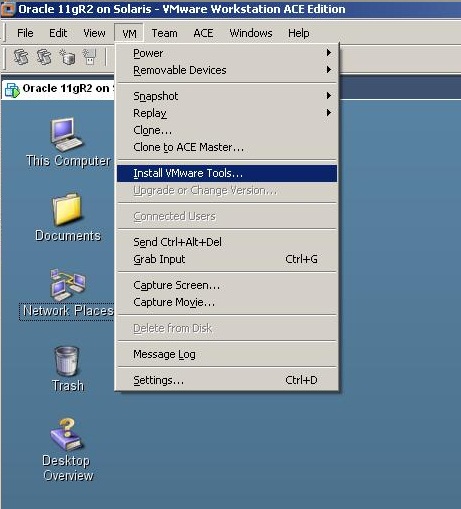
After installing the Solaris, login with root user. As a first step let’s install VMware tools. For this, disconnect the installation dvd and select “Install VMware tools” from the VM menu
After some seconds a new window will appear.
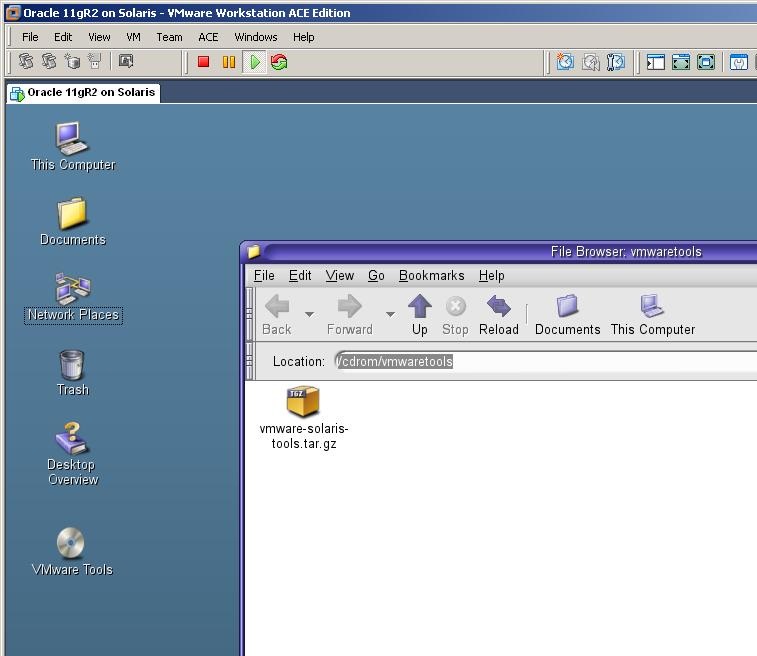
Get its address, copy the file from to the /tmp directory using a terminal window, unzip and install it

Get into the unzipped folder and run the installation file.
[code]
cd vmware-tools-distrib
./vmware-install.pl
[/code]
After the installation completes, logout from the root user and login again
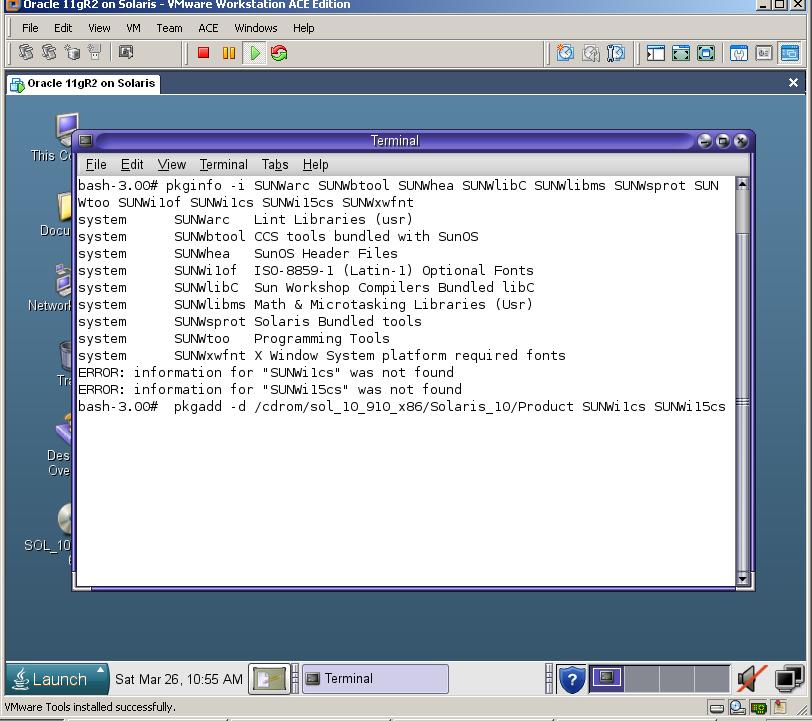
Now, let’s check the installed OS packages that are required for the Oracle installation. For this, run the following command:
[code]pkginfo -i SUNWarc SUNWbtool SUNWhea SUNWlibC SUNWlibms SUNWsprot SUNWtoo SUNWi1of SUNWi1cs SUNWi15cs SUNWxwfnt
[/code]
You should miss two packages – 1) SUNWi1cs 2) SUNWi15cs
To install them, mount the Solaris installation dvd and run the following command:
[code]pkgadd -d /cdrom/sol_10_910_x86/Solaris_10/Product SUNWi1cs SUNWi15cs[/code]
If the mount point of the cdrom is different in your environment, specify the correct path to the dvd
After installation completed perform the following steps:
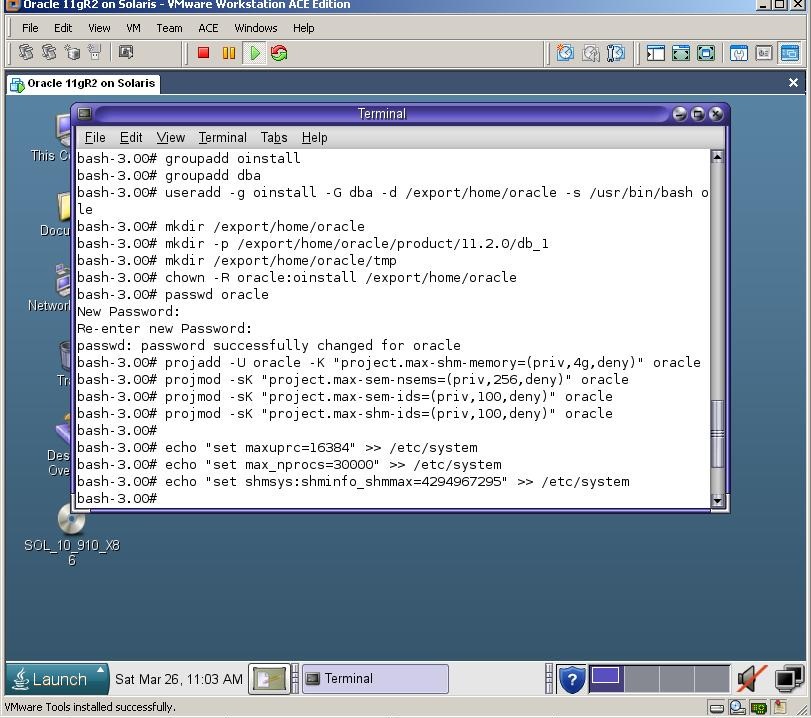
1) Create necessary groups and a user
[code]
groupadd oinstall
groupadd dba
useradd -g oinstall -G dba -d /export/home/oracle -s /usr/bin/bash oracle
passwd oracle
[/code]
2) Create necessary folder for the installation
[code]mkdir -p /export/home/oracle/product/11.2.0/db_1
mkdir /export/home/oracle/tmp[/code]
[code]chown -R oracle:oinstall /export/home/oracle[/code]
3) Change kernel parameters
[code]
projadd -U oracle -K "project.max-shm-memory=(priv,4g,deny)" oracle
projmod -sK "project.max-sem-nsems=(priv,256,deny)" oracle
projmod -sK "project.max-sem-ids=(priv,100,deny)" oracle
projmod -sK "project.max-shm-ids=(priv,100,deny)" oracle
echo "set maxuprc=16384" >> /etc/system
echo "set max_nprocs=30000" >> /etc/system
echo "set shmsys:shminfo_shmmax=4294967295" >> /etc/system
[/code]
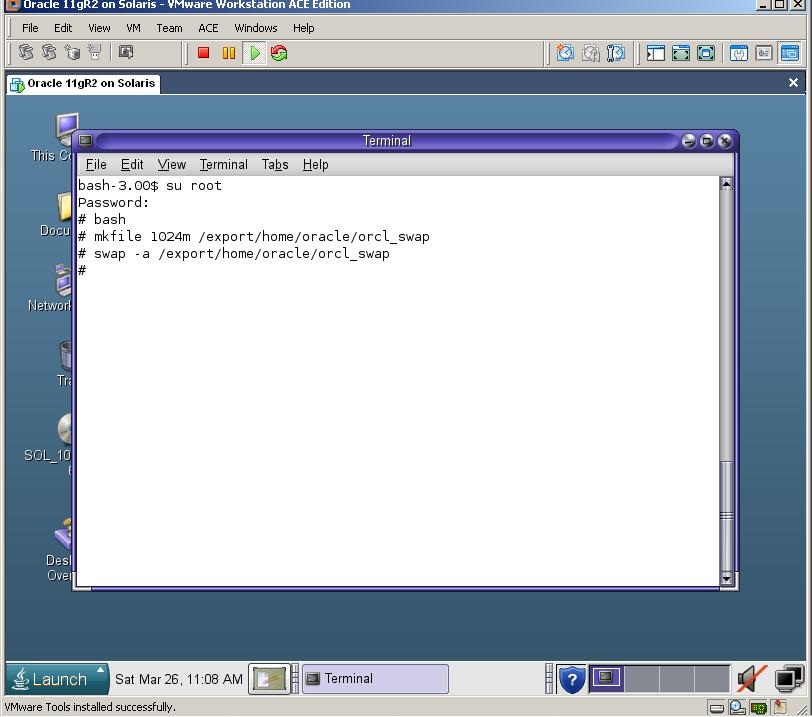
Now reboot the machine and login with an oracle user. Let’s create a new swap file with 1Gb size, as it’s required for the Oracle installation
[code]
mkfile 1024m /export/home/oracle/orcl_swap
swap -a /export/home/oracle/orcl_swap
[/code]
Now change the .profile file of the oracle user and set necessary environment variables:
gedit /export/home/oracle/.profile
[code]
export ORACLE_BASE=/export/home/oracle
export ORACLE_HOME=$ORACLE_BASE/product/11.2.0/db_1
export PATH=$ORACLE_HOME/bin:$PATH
export TMP=/export/home/oracle/tmp
export TMPDIR=/export/home/oracle/tmp
export DISPLAY=:0.0
[/code]

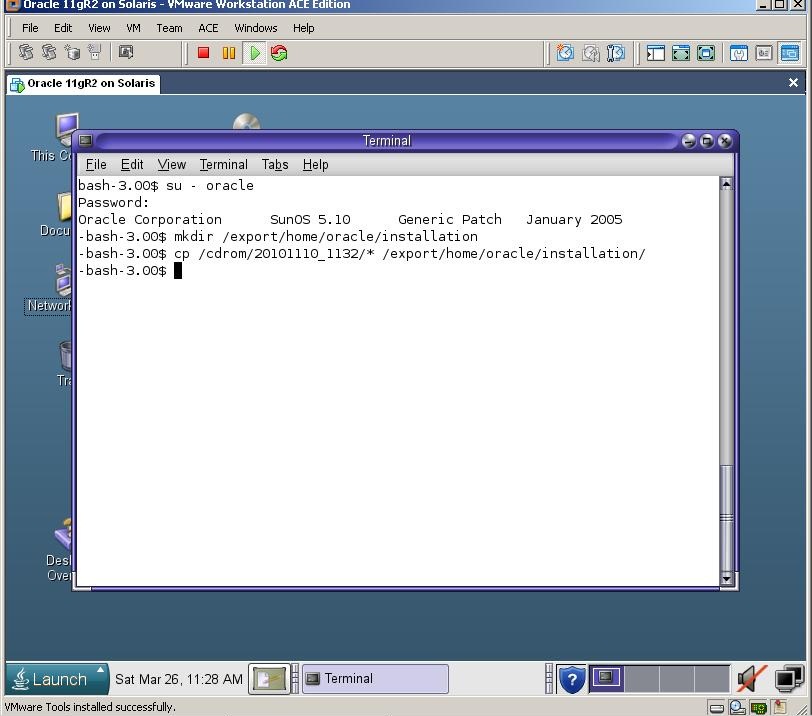
Now create an “installation” direcotry under /export/home/oracle
Then mout the cdrom device and copy the installation files to that directory
Extract both files uzing unzip utility, and start the installation
[code]
unzip your_file1.zip
unzip your_file2.zip
cd database
./runInstaller
[/code]
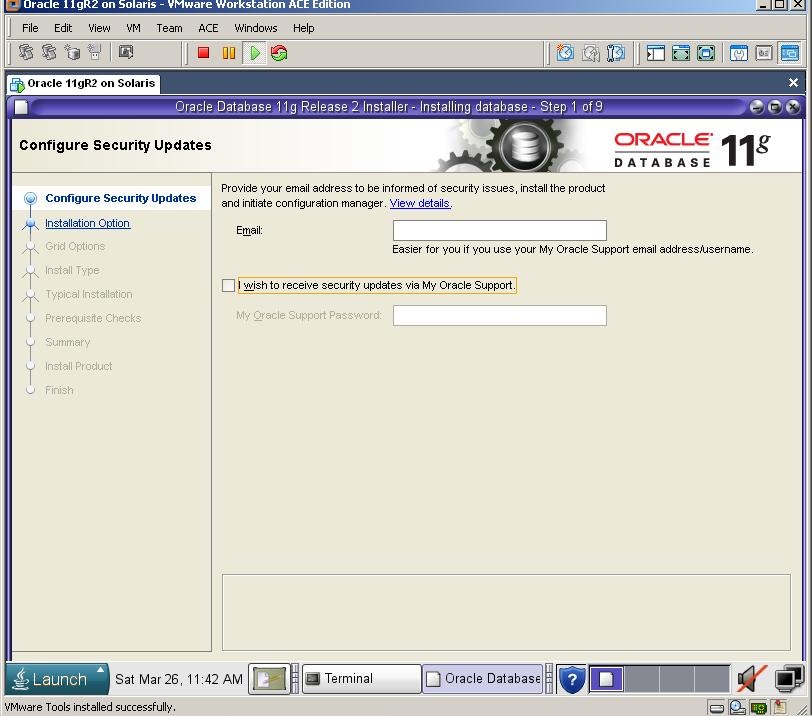
Uncheck the checkbox and click next. If you can’t see the Next button, use Alt+N combination 
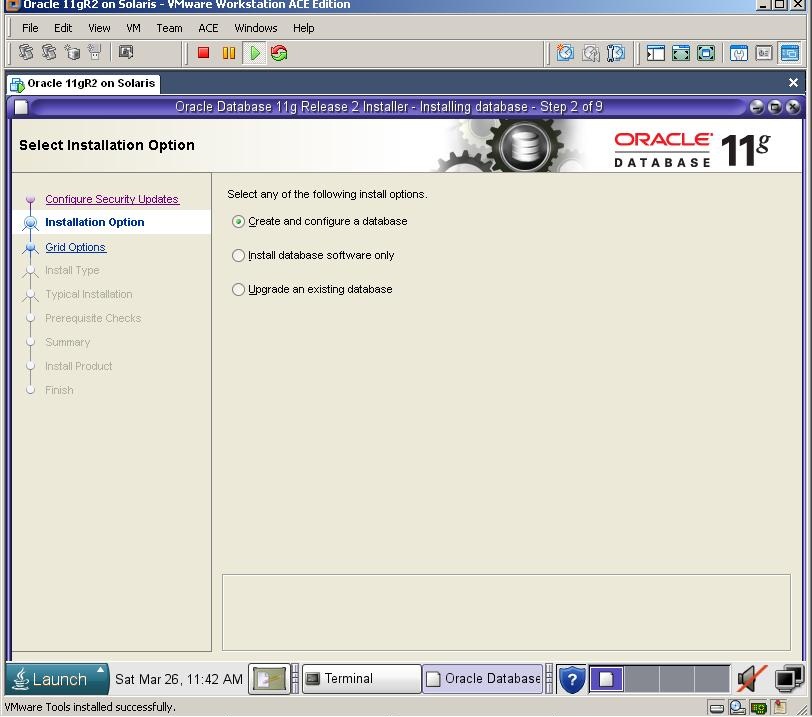
Select the first option and click next
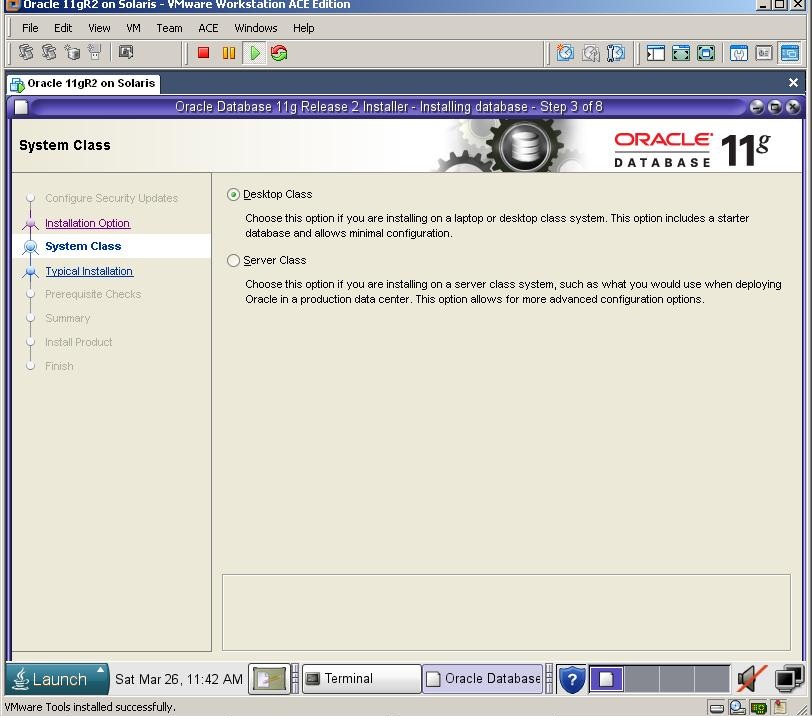
Click Next
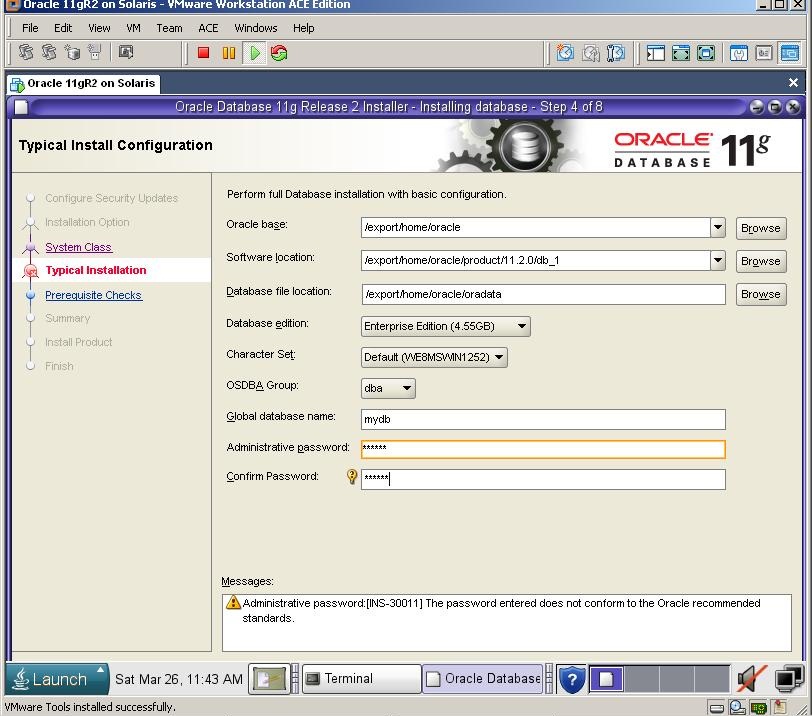
Defint the folder for Oracle installation, database name and passwords and click next
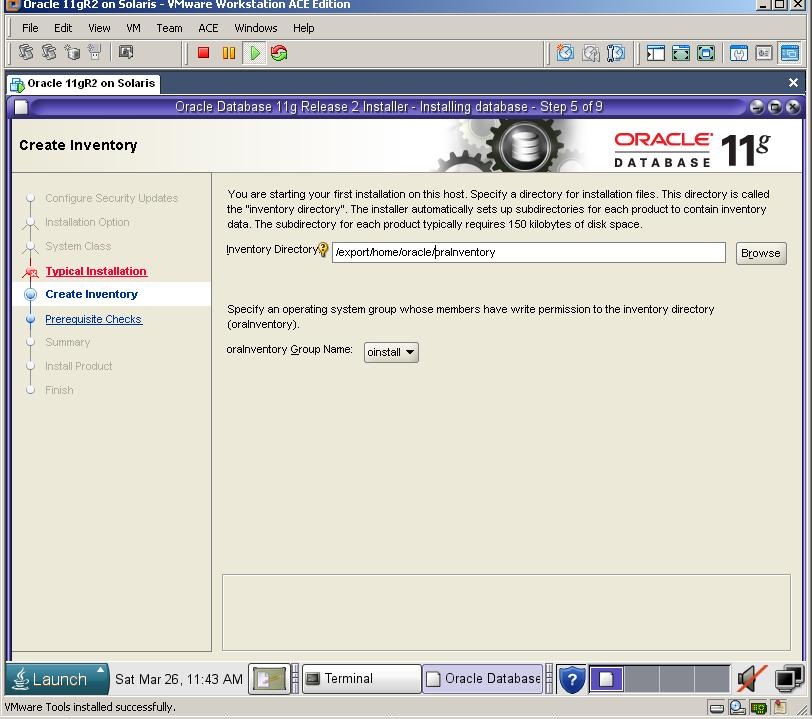
Click Next
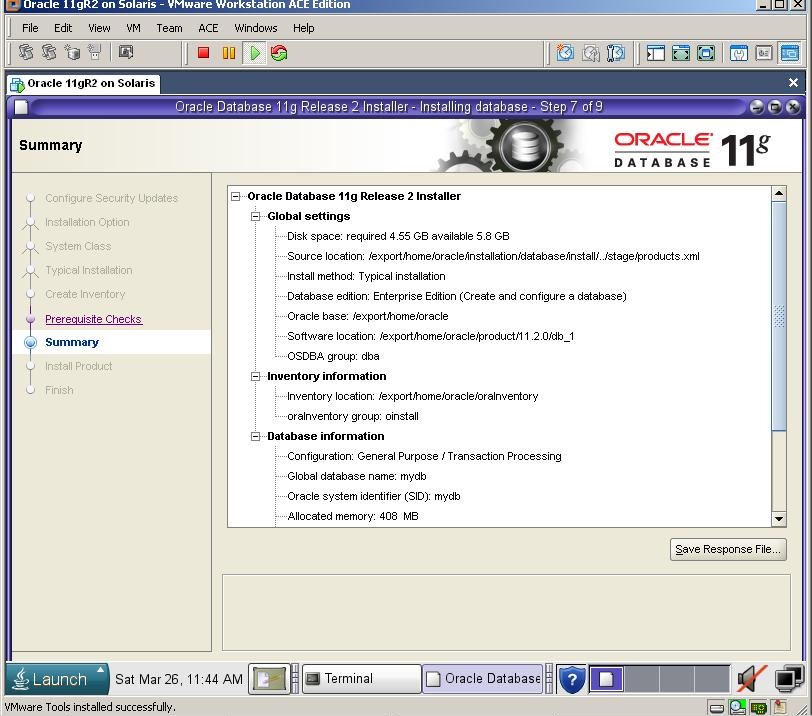
Click Finish to start the installation.
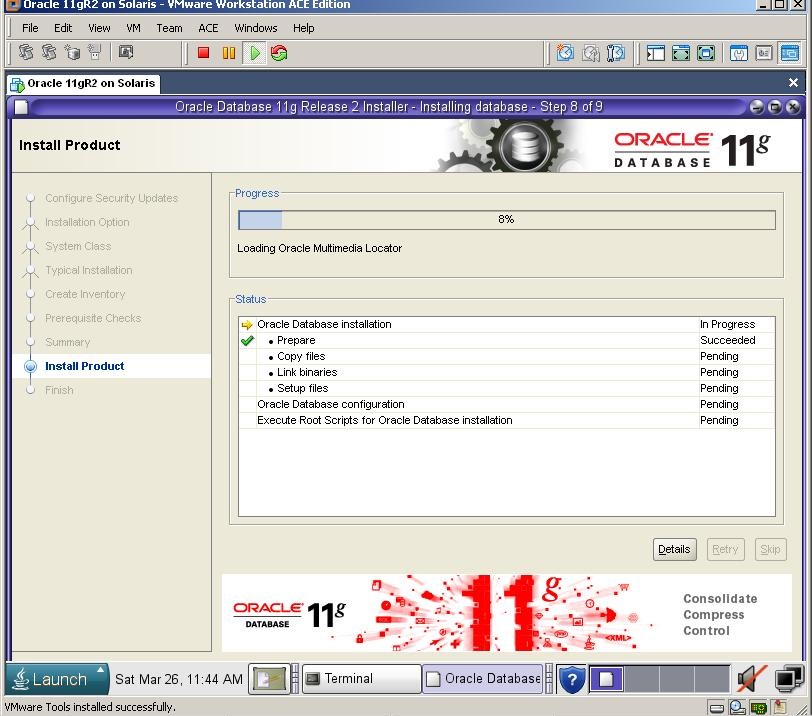
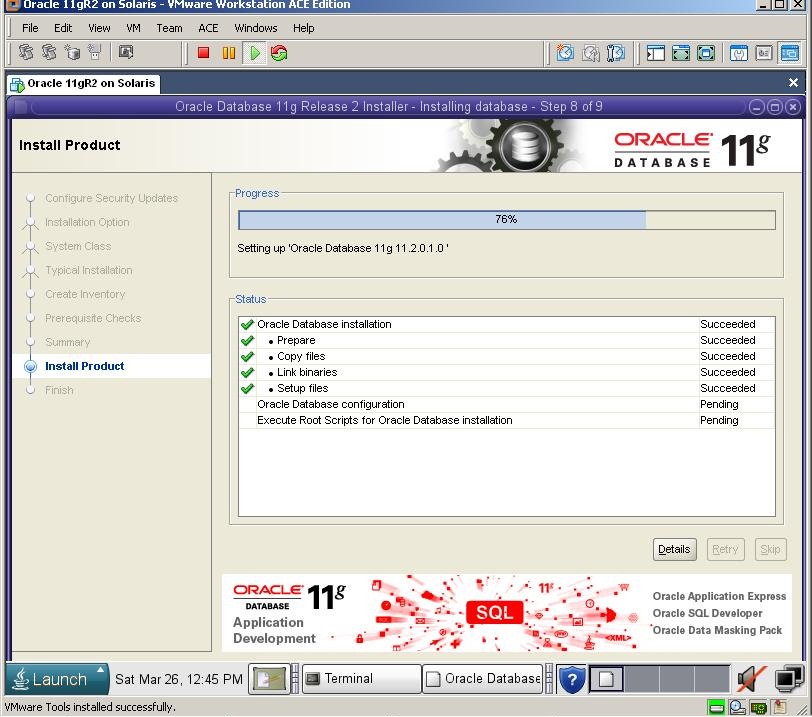
After the installation of the software finishes, installer automatically runs the DBCA to create the database
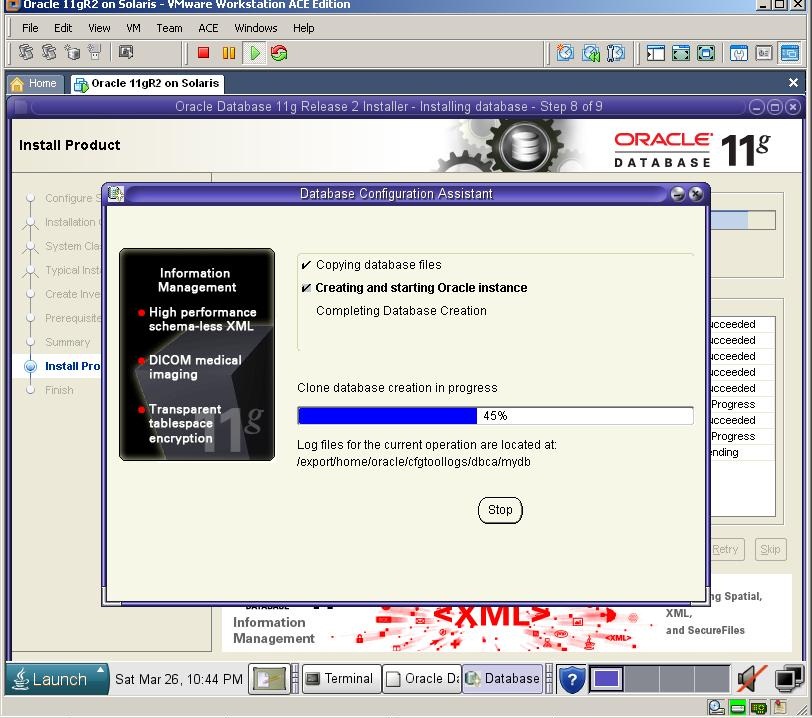
After a while, installation finishes.

Click OK and you’ll be prompted to run orainstRoot.sh and root.sh
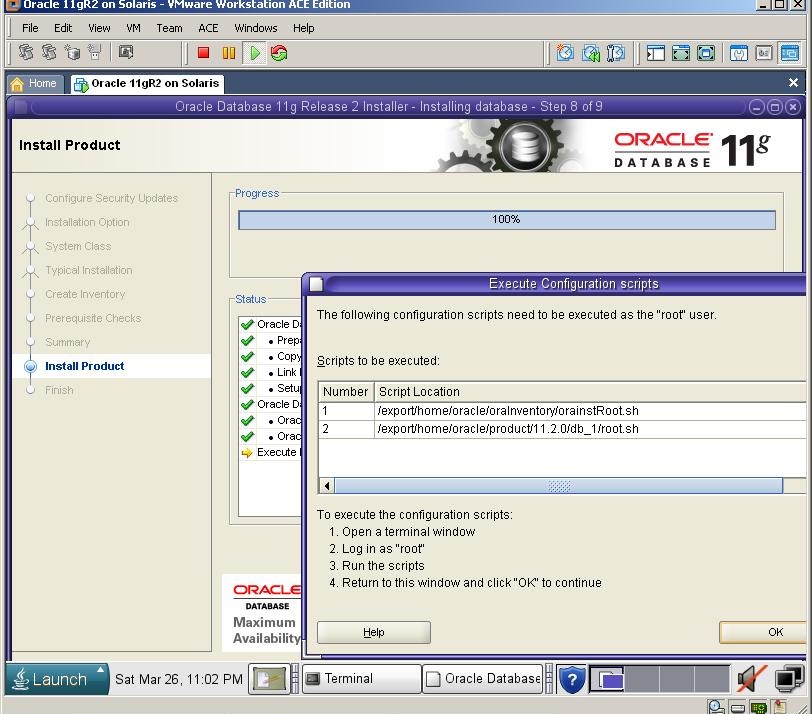
Switch to the previous Terminal, create new window, login with a root user and run both shell scripts

At last, you’ll get success message

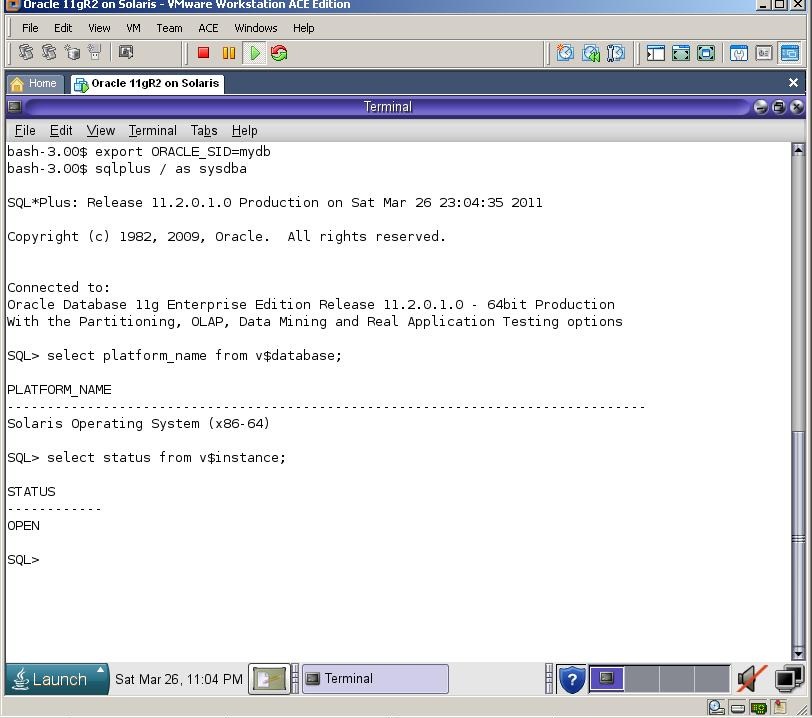
Now let’s connect to the database from Sql*Plus
April 1st, 2011 at 4:06 am
Hi.I want install Oracle 11g on solaris 10 but I don’t unzip database file.
# unzip solaris.sparc64_11gR1_database_1013.zip
error:
Archive: solaris.sparc64_11gR1_database_1013.zip
End-of-central-directory signature not found. Either this file is not
a zipfile, or it constitutes one disk of a multi-part archive. In the
latter case the central directory and zipfile comment will be found on
the last disk(s) of this archive.
unzip: cannot find zipfile directory in one of solaris.sparc64_11gR1_database_1013.zip or
solaris.sparc64_11gR1_database_1013.zip.zip, and cannot find solaris.sparc64_11gR1_database_1013.zip.ZIP, period.
Please help me
April 1st, 2011 at 9:27 am
Dear Bakhtiyar
It seems your zip file is corrupted. Please download it again, check the checksum and try it
Good Luck!
April 14th, 2011 at 9:07 pm
Hi! Kamran, what installation files I must copy into the /export/home/oracle/installation folder? where to get them? Please, explain from that moment and next step.
Thank in advance
April 29th, 2011 at 4:36 pm
HI Kamran,
Your Blog is very helpful to all buddies in oracle like me.
In Step by Step installing Oracle 10g RAC on VMware. Screenshot No.59, i get stucked. I cannot create the ORACLE_BASE,ORACLE_HOME and other directories as oracle user. and why we add all env variables in root’s .bash_profile file.
please clarify my boubt.
Thanks and Regards,
Nagarjuna Reddy
May 2nd, 2011 at 8:13 pm
Add those environment variables to the .bash file of the oracle user, switch to the oracle user, make sure all those variables are set (using echo command) and create the folders
June 1st, 2011 at 4:51 pm
sir, i get job in good company on DBA post but i have exp in oracle sql .pl/sql .i have not exp in oracle 11g dba. pls guide me what i do .my current project upCl up.work stat
June 7th, 2011 at 5:38 pm
Dear Amod
I’d suggest you to start reading Oracle documentation from http://tahiti.oracle.com
June 17th, 2011 at 7:40 am
File not found
/export/home/oracle/product/11.2.0/db_1/owb/external/oc4j_applications/applications/WFMLRSVCApp.ear
Solution:
unzip win64_11gR2_database_1of2
unzip the win64_11gR2_database_2of2
cd database–>stage–>Components and copy all folders
go to win64_11gR2_database_1of2 –>database–>stage–>componenets
and paste them all and rerun setup.exe from first unzip fil
June 17th, 2011 at 4:49 pm
Dear Stan, you got the error because you’ve unzipped both files to seperate directory. Unzip them to the same directory and try the installation
Check the following metalink note for more information
Installing 11G on Any Platform : File Not Found Errors Running RunInstaller/Setup.exe [ID 468771.1]
July 8th, 2011 at 7:38 pm
Hi Kamran,
I have installed Solaris 10 x86, and have done all the configurations in preparation for Oracle 11g installation..
Just to be sure..Where should the Oracle installation files be downloaded to, and unzipped to?
July 11th, 2011 at 9:31 am
Dear Olu
You can download and unzip the oracle installation to any directory in your system.
July 29th, 2011 at 10:45 pm
During the installation of Solaris 10, what should be the proper disk layout requirements for a successful Oracle 11g installation. I have always selected auto-layout, but I get the following error message – INS-32021: Insufficient disk space on this volume for the selected Oracle home.
For a lab environment, assuming I am allocating 20g for the Disk space of my Solaris machine, you give me pointers on how I should layout my disk space.
August 4th, 2011 at 2:17 pm
hi Kamran,
I can’t connect to sql plus by using connect /as sysdba
the system keep asking me username & password.
What should i fill in?
Thanks much
Long
August 11th, 2011 at 2:49 pm
Dear Long
Please post the output and error you get
August 11th, 2011 at 9:14 pm
Hi kamran,
I am installing Oracle11gR1 on Solaris 5.10 Sparc 64 bits. it has 64 GB RAM. There will be about 8 instance on this server. Each database will have processes=300 SGA size ranging from 2 -6GB. I would like to allocate 46GB to oracle. What kernel parameters I need to change and what’s value should be?
Thank you in advance.
Pravin
August 15th, 2011 at 8:49 am
Dear Kamran,
i have installed oracle 11G express. Is it same method of installations? This because this solaris machine was on text mode. No GUI.
Please advise
September 4th, 2011 at 3:30 pm
Hi Kamran,
Am not sure abt others but for me it’s very helpfull these steps……………
In my company we have standard procedure for creating DB like need to install specific patches to it(like patch #12311357,12431716) etc…please let me know how to install those patches….waiting for ur reply….
September 16th, 2011 at 7:13 pm
Hi Vivek
Patch installation guide is writte README file inside the patchset. Just read and follow the steps. It’s very simple
September 5th, 2011 at 6:07 pm
Hi i completed installation successfully but sqlplus is not working for me
And when i try to reinstall once again am getting below error
>>> Ignoring required pre-requisite failures. Continuing…
Preparing to launch Oracle Universal Installer from /tmp/OraInstall2011-09-05_06-04-16PM. Please wait …
DISPLAY not set. Please set the DISPLAY and try again.
Depending on the Unix Shell, you can use one of the following commands as examples to set the DISPLAY environment variable:
– For csh: % setenv DISPLAY 192.168.1.128:0.0
– For sh, ksh and bash: $ DISPLAY=192.168.1.128:0.0; export DISPLAY
Use the following command to see what shell is being used:
echo $SHELL
Use the following command to view the current DISPLAY environment variable setting:
echo $DISPLAY
– Make sure that client users are authorized to connect to the X Server.
To enable client users to access the X Server, open an xterm, dtterm or xconsole as the user that started the session and type the following command:
% xhost +
To test that the DISPLAY environment variable is set correctly, run a X11 based program that comes with the native operating system such as ‘xclock’:
%
Can someone help me on this…
September 16th, 2011 at 7:11 pm
Hi Vivek
Have you tried to set it as it described in this post?
September 7th, 2011 at 11:39 pm
Hi Kamran ,
Thanks for sharing the info, could you also please guide me to install the same in silent mode since we are not able to invoke GUI on citrix application.
Thanks in Advance!!
September 9th, 2011 at 10:53 am
HI Khan
Check the following link to get information about Silent installation of Oracle 11g on Solaris
http://download.oracle.com/docs/cd/E11882_01/install.112/e17163/app_nonint.htm#BABFEECI
September 10th, 2011 at 5:34 pm
Hi Kamran,
I am getting an error while running the Installer. Pl check this
bash-3.00$ ./runInstaller
/export/home/oracle/Installation/database/install/.oui: syntax error at line 1: `|’ unexpected
I have been looking at the Solaris OS and DB 11gr2 compatibility. The solaris OS that I have used (and being used in this post) is sol-10-u9-ga-x86-dvd – a 32 bit OS.
However, the 11gr2 DB packages i.e. “solaris.x64_11gR2_database_1of2 and solaris.x64_11gR2_database_2of2” are compatible with x86-64.
Is this what is creating a problem? Pl advice.
Also, pl let me know your system configuration because I have using Intel i5 core vpro 150M which I believe is not a x86-64 processor.
Awaiting your response.
Regards,
Nikhil.
September 16th, 2011 at 7:10 pm
Hi Nikhil
You try to install 64 bit Oracle on 32 bit OS, which is not supported. Please download correct soft and install it. You should succeed
September 23rd, 2011 at 4:14 am
Hello Kamran,
I’ve been following your steps installing Oracle 11g R2 on solaris 10.
Everything’s been working well until i changed directory to database and executed the $ ./runInstaller command
-bash-3.00$ cd database
-bash-3.00$ ls
doc response runInstaller stage
install rpm sshsetup welcome.html
-bash-3.00$ ./runInstaller
/export/home/oracle/installation/database/install/.oui: syntax error at line 1: `|’ unexpected
Here’s my OS version
“Sun Microsystems Inc. SunOS 5.10 Generic January 2005”
Is it compatible with 11g R2 or i need later Solaris OS.
Regards
Laitan
October 11th, 2011 at 12:45 am
Excelent! this information!, for this intalllation!!!, Txnss!!!
October 20th, 2011 at 10:38 am
[…] 4. Step by Step installing Oracle 11g R2 on Oracle Solaris 10 […]
November 14th, 2011 at 2:50 pm
hi kamran,
oracle 11g r2 installation check fails at 3 packages because of
libaio-develop-0.3.106
unixODBC-2.211
unixODBC-devel 2.2.11
packages not installed.
to overcome this we will install rpms from os cd.
my question is instead of installing this three rpms later, con’t we install at the time of os installation only.
Please let me know. I hope this comment will answer.
Thanks a lot.
November 15th, 2011 at 5:53 am
It’s not possible to install *all* packages directly from the installation, they should be installed after the installation
December 2nd, 2011 at 10:46 pm
Thanks for this. Saved me a huge amount of time.
December 3rd, 2011 at 3:50 am
HI Kamran Agayev
I got the following error when i was executing ./runInstaller file in installion Oracle 11gr2 on Solaris 10 x86 on Intel Machine.
/install/.oui: syntax error at line 1: `|’ unexpected
could you please suggest me to solve the error.
December 9th, 2011 at 6:38 am
It seems you use 64bit installation on 32bit OS or vice verse
December 6th, 2011 at 2:43 pm
Hi, I follow your manual installation, everything is ok, but when I tried to start Oracle this error is displaying:
bash-3.00$ export ORACLE_SID=orcl
bash-3.00$ sqlplus /as sysdba
bash:sqlplus: command not found
Could you help me with this please?
Regards
December 6th, 2011 at 2:58 pm
Just make sure you’ve set PATH variable correctly
export PATH=$ORACLE_HOME/bin:$PATH
And make sure you’ve already set ORACLE_HOME environment variable
December 13th, 2011 at 4:20 pm
Thank you for your answer, I export environments variables and work ok, but when I shutdown my machine and start again, trying to start SQLPlus but I cannot.
This message is displaying: “Connected to an idle instance.”
and when I try to execute some query and error display.
Please can you help me?
December 27th, 2011 at 5:34 pm
Hello Kamran,
Excellent blog, helped me a lot in standalone installation. Do you have same kind of document for RAC installation also in 2-nodes SPARC system environment?
All the help will be highly appreciated.
Thanks!!!
–
Regards
SS
January 11th, 2012 at 7:22 pm
Hi
Really very helpful
Note: please specify the kernel parameter lillte clear
Thanks
satya
February 9th, 2012 at 2:07 pm
Hi
what is the minimum solaris release needed for Oracle 11g to be installed.
I am trying to install oracle on following release, but its failing.
Solaris 10 6/06 s10s_u2wos_09a SPARC
February 12th, 2012 at 4:22 pm
Check the following link:
http://docs.oracle.com/cd/E11882_01/install.112/e24346/pre_install.htm#BABFDGHJ
February 15th, 2012 at 12:24 pm
Dear Kamran,
Thankyou for your valuable information, I could not be able to successfully installed oracle on Solaris but it was done on linux.
The file I have downloade from edelivery.oracle.com as below for 11gr2 installation on Solaris
Operating System – Oracle Solaris 10 8/11 Operating System, Multi-Language, (x64/x86)
Database – Oracle Database 11g Release 2 (11.2.0.1.0) for Solaris Operating System (x86-64) (Part 1 of 2)
– Oracle Database 11g Release 2 (11.2.0.1.0) for Solaris Operating System (x86-64) (Part 2 of 2)
I followed your given step to install 11gr2 on Solaris 10, the installation is going smooth till 95% of installation progress but suddenly I got error says “INS:20802 Oracle Net Configuration Assistant Failed” and when I clicked on detail button it was mention “Cause : The plug-in failed in its perform method” and “Action : Refer to the logs”.
I checked the log and it was as below
INFO: Oracle Net Services Configuration:
INFO: #
INFO: # An unexpected error has been detected by HotSpot Virtual Machine:
INFO: #
INFO: # SIGSEGV (0xb) at pc=0xfffffd7fe8018ff9, pid=3704, tid=1
INFO: #
INFO: # Java VM: Java HotSpot(TM) 64-Bit Server VM (1.5.0_17-b03 mixed mode)
INFO: # Problematic frame:
INFO: # C [libclntsh.so.11.1+0xe18ff9] snlinGetAddrInfo+0x499
INFO: #
INFO: # An error report file with more information is saved as hs_err_pid3704.log
INFO: #
INFO: # If you would like to submit a bug report, please visit:
INFO: # http://java.sun.com/webapps/bugreport/crash.jsp
INFO: #
WARNING: Abort – core dumped
WARNING:
INFO:
INFO: Completed Plugin named: Oracle Net Configuration Assistant
INFO: Oracle Net Configuration Assistant failed.
INFO: Oracle Net Configuration Assistant failed.
INFO: ConfigClient.executeToolsInAggregate action performed
INFO: Exiting ConfigClient.executeToolsInAggregate method
INFO: Calling event ConfigToolsExecuted
INFO:
The Runconfig command constructed is /export/home/oracle/product/11.2.0/db_1/oui/bin/runConfig.sh ORACLE_HOME=/export/home/oracle/product/11.2.0/db_1 MODE=perform ACTION=configure RERUN=false $*
INFO: Created a new file /export/home/oracle/product/11.2.0/db_1/cfgtoollogs/configToolFailedCommands
INFO: Since the option is to overwrite the existing /export/home/oracle/product/11.2.0/db_1/cfgtoollogs/configToolFailedCommands file, backing it up
INFO: The backed up file name is /export/home/oracle/product/11.2.0/db_1/cfgtoollogs/configToolFailedCommands.bak
INFO: ConfigClient.saveSession method called
INFO: Calling event ConfigSessionEnding
INFO: ConfigClient.endSession method called
INFO: Completed Configuration
INFO: Shutting down OUISetupDriver.JobExecutorThread
INFO: Cleaning up, please wait…
INFO: Dispose the install area control object
INFO: Update the state machine to STATE_CLEAN
INFO: All forked task are completed at state setup
INFO: Completed background operations
INFO: Moved to state
INFO: Finding the most appropriate exit status for the current application
INFO: Exit Status is -2
INFO: Shutdown Oracle Database 11g Release 2 Installer
And hs_err_pid3704.log shows as below
#
# An unexpected error has been detected by HotSpot Virtual Machine:
#
# SIGSEGV (0xb) at pc=0xfffffd7fe8018ff9, pid=3704, tid=1
#
# Java VM: Java HotSpot(TM) 64-Bit Server VM (1.5.0_17-b03 mixed mode)
# Problematic frame:
# C [libclntsh.so.11.1+0xe18ff9] snlinGetAddrInfo+0x499
#
———– —- T H R E A D —————
Current thread (0x000000000042d090): JavaThread “main” [_thread_in_native, id=1]
siginfo:si_signo=11, si_errno=0, si_code=1, si_addr=0x0000000000000010
Your kind assistant is required, I tried more than 10 time but still have same problem.
Thank & regards
Shahid
February 19th, 2012 at 12:36 pm
Dear Kamran,
Thankyou for your valuable information, I could not be able to successfully installed oracle on Solaris but it was done on linux.
The file I have downloade from edelivery.oracle.com as below for 11gr2 installation on Solaris
Operating System – Oracle Solaris 10 8/11 Operating System, Multi-Language, (x64/x86)
Database – Oracle Database 11g Release 2 (11.2.0.1.0) for Solaris Operating System (x86-64) (Part 1 of 2)
– Oracle Database 11g Release 2 (11.2.0.1.0) for Solaris Operating System (x86-64) (Part 2 of 2)
I followed your given step to install 11gr2 on Solaris 10, the installation is going smooth till 95% of installation progress but suddenly I got error says “INS:20802 Oracle Net Configuration Assistant Failed” and when I clicked on detail button it was mention “Cause : The plug-in failed in its perform method” and “Action : Refer to the logs”.
I checked the log and it was as below
INFO: Oracle Net Services Configuration:
INFO: # An unexpected error has been detected by HotSpot Virtual Machine:
INFO: # SIGSEGV (0xb) at pc=0xfffffd7fe8018ff9, pid=3704, tid=1
INFO: # Java VM: Java HotSpot(TM) 64-Bit Server VM (1.5.0_17-b03 mixed mode)
…….
Your kind assistant is required, I tried more than 10 time but still have same problem.
Thank & regards
Shahid
February 20th, 2012 at 10:39 pm
It seems an unexpected error of the Virtual Machine. I also got it several times, and I do hope you need to start the installation again and see what happens
March 6th, 2012 at 6:35 am
Hi Kamran,
Thanks a ton.. You have done a great job. i had exact similar situation with solaris 10 VM on MAC. I followed your instructions and successfully installed oracle.
Thanks
Jeet !!
March 6th, 2012 at 6:37 am
Thanks for the feedback Jeet! It’s nice to hear my articles are helpful
Keep visiting my blog!
May 28th, 2012 at 5:04 am
Hi Kamran,
I am new to this Virtualization world and today i just completed the following –
1.Install VMplayer
2.Created SunSolaris10 vmmachine successfully.
3.how to add additional space in this vmmachine ?
4.how to create mountpoints thereafter ?
3.And later how to copy the oracledatabase11gr2 zip files to this virtual image from my laptop ?
I am stuck in this project can u plz shade some lights on this or help me proceed.
Thanks a ton
Jeet
June 11th, 2012 at 12:07 am
Hi Kamran, I have downloaded the zip files
Oracle Database 11g Release 2 (11.2.0.1.0) for Solaris Operating System (x86-64)from OTN website
solaris.x64_11gR2_database_1of2.zip
solaris.x64_11gR2_database_2of2.zip
I’m install Solaris 10 X86 and when execute run installer I got this message database/install/.oui: syntax error at line 1: `|’ unexpected, what it’s wrong?
Regards R,
June 15th, 2012 at 7:41 am
It’s not possible to install x86-64 Oracle over x86 Solaris OS
June 27th, 2012 at 8:19 am
bash-3.2$ ./runInstaller -ignoreSysPrereqs
/export/home/oracle/installation/solaris.x64_11gR2_database_1of2/database/install/.oui: syntax error at line 1: `|’ unexpected
can you please suggest which OS to be downloaded and how to proceed with the installation?
June 27th, 2012 at 11:44 am
It seems you’re installing 64 bit oracle on 32 bit OS
June 29th, 2012 at 12:11 pm
dear Kamran
i follow your steps but at the begin of installation an error appear and i can’t continue the installation
the error is ::”invalid entry CRC (expected 0x8336fdaa but got 0xe016f73c)”
i install oracle 11g over solaris 10 X86
waiting your reply plz
June 29th, 2012 at 12:17 pm
It seems the download file is corrupted
July 6th, 2012 at 10:34 am
Hi Kamran
I am trying to install oracle 11r2 on solaris 11 .
But some how not able to install packages on the server.To install the packages internet connection is must? or is there any other workaround ?
I have downloaded the (Download for x86 – Text Install (430 MB))
from oracle site.
oracle installation is solaris.x64_11gR2_database_1of2 and solaris.x64_11gR2_database_1of2 which i have downloded from oracl e site.
Looking for your reply
July 6th, 2012 at 10:38 am
You should find those package under the unpacked folder of the installation file
July 6th, 2012 at 11:04 am
Hi Kamran
I tried to find and search the same in unpacked folder with SUNW* i could not find any file naming with starting with this .
Like what we find in ../PRODUCT folder of the solaris 10 64 bit installation folder.
Looking for your reply.Size of unziped folder is only 430 MB.
August 5th, 2012 at 7:42 pm
Hi Karman,
First of all I must thanks you for this clear explanation, I followed your guide twice carefully (except that I choosed “Host-Only” not “Bridged” for the VM network), but every time I received an Error while “Oracle Net Configuration Assistant” phase, the error message says that “[INS-20802] Oracle Net Configuration Assistant failed, Cause – The plug-in failed in its perform method”, I skipped this step but of course another error message received says “Enterprise manager configuration failed due to the following error – Listener is not up or database service is not registered with it”
I searched Oracle Metalink for [INS-20802] and the closest answer is “According to Bug.9540254, this is related to the issue with Windows Server 2003 when IPv6 is configured; after disable ipv6 NIC, the issue was resolved. The behavior only occurs when IPv6 is installed on Windows 2003. ” but the problem is that I’m sure I disabled the IPv6 while installing Solaris !!
so please help, Thanks in advance
August 23rd, 2012 at 9:56 pm
Hi,
I am installing oracle 11g R2 on red hat linux 5.3
When I start install, I get the following errors:
error in invoking target ‘nmo’ of makefile ins_sysman.mk’
September 14th, 2012 at 5:19 am
Have you checked google?
http://ora10gadmin.blogspot.com/2012/05/error-in-invoking-target-allnoorcl-of.html
February 15th, 2013 at 1:04 pm
Kamran,
I would like to thabks you for this excelent tutorial!
Regards,
Steven
February 15th, 2013 at 1:07 pm
Hi Buyne
Thanks for the feedback my friend, I appreciate it
February 18th, 2013 at 8:12 pm
A great walkthrough, thanks!
One thing is that the installer demands that the swap file (orcl_swap) is at least 4 GB, once this is corrected it is smooth sailing
Vincent
March 3rd, 2013 at 9:05 am
Hi admin
I’ve a problem while installing oracle 11g
that’s here:
invalid entry size(expected 16026432 but got 16026434 bytes)
cause: no additional information available
action: refer to the logs or contact oracle support services
summary: invalid entry size(expected 16026432 but got 16026434 bytes)
June 13th, 2013 at 5:54 am
Check this link
http://arjudba.blogspot.com/2012/06/invalid-entry-size-error-during-oracle.html
March 19th, 2013 at 7:43 pm
Hi Yogesh
#I am trying to install oracle 11r2 on solaris 11 .
#But some how not able to install packages on the server.To install the packages internet #connection is must? or is there any other workaround ?
Solaris 11 have IPS (Image Packaging System) an not SRV4-Packaging (Solaris10).
If you want to use the official oracle repository, yes – you need an internet connection.
But you are able to host your own solaris11-repository, then you dont need an internet connection.
–> http://docs.oracle.com/cd/E23824_01/html/E21803/
–> https://blogs.oracle.com/jimlaurent/entry/building_a_solaris_11_repository
Regards,
solix
August 27th, 2013 at 5:15 pm
Hi kamran;
I am very eager to install 11g on solaris OS. I was searching torrent links but they are not workable and not good.
If any site provides official link to download solaris10 freely , please provide the link.
Way of expression is good that’s why i am planning to install 11g on solaris.
Good job kamran. Thanks.
August 28th, 2013 at 8:11 am
Hi Kamran,
Thanks a lot for the step by step guide for Oracle 11g R2 installation.
I got stuck at 43% installation & your blog helped to overcome by placing all the files of Components folder of second zip file into Components folder of 1st zip file. Voila it went smooth without any issues.
However I installed only the db software & no database as I have to create a custom database.
I am not able to open the Oracle Enterprise Manager. Can u pls help? When I checked for any oracle services running on the system by ps _eaf | grep -i oracle, there was no output. Seems no services are running. Pls help.
OS= Solaris 10 update 10 x86
Oracle DB = 11g R2 Enterprise Edition.
Regards,
Kuldeep
August 28th, 2013 at 8:34 am
Hi Kuldeep
You need to export PATH variable to make OS to find dbca executable. Or you can run it directly from $ORACLE_HOME/bin directory
Go to the folder where you installed Oracle, switch to the bin folder and run dbca executable
August 28th, 2013 at 8:53 am
Hi Kamran,
Thanks. I got the dbca & it is running now however can u pls share the list of Environment Variables to be set permanently for oracle user. I have to do it manually every time.
regards
August 28th, 2013 at 8:56 am
Check this link to get more information on Environment variables
http://docs.oracle.com/cd/B19306_01/server.102/b15658/admin_ora.htm#i46652
Main environment variables are :
$ORACLE_BASE
$ORACLE_HOME
$ORACLE_SID
March 26th, 2014 at 11:58 am
Hi Kamran,
can you please share any installation guide for installing Oracle 11g R2 on Solaris 11.1
April 28th, 2014 at 11:05 am
Tashakur Mr.Kamran your guide help me. As I know in your blog I can`t find backup&recovery guide. Can you write some special guide, because You write very accessible guide especially for junior DBA`s.
June 11th, 2014 at 8:46 am
Hi Komil
Have you checked my book?
May 20th, 2014 at 12:25 pm
Hi,
I am trying to install oracle 11gr2 software on my x86 solaris VM.I have the following entries in /etc/passwd.
ora11gr2::69990:300::/usr/oracle/11gr2:/bin/ksh
oracle8i:x:7777:300::/usr/oracle/817:/bin/ksh
The following added to /etc/group/
dba::300:ora11gr2,oracle8i,root
Those home directories are existing in the system. I am trying to run the installer and is complaining about the DISPLAY variable. How do I set that in this case.Please help me
# echo $SHELL
/sbin/sh
Also I did not set the .profile for ora11gr2 use yet.
June 11th, 2014 at 8:29 am
Are you using Xshell to get a graphical view?
March 19th, 2015 at 11:10 am
After following your steps I was able to create a new Solaris VM with Oracle Database11gR2.
April 7th, 2015 at 5:19 am
Brilliant Anand. Happy to see it helped
August 28th, 2017 at 8:12 am
Fantastico post. Gracias por compartirlo…Espero màs…
Saludos